**SmokePing為開源的網路品質監控專案,LibreNMS可整合Smokeping方便監測設備**
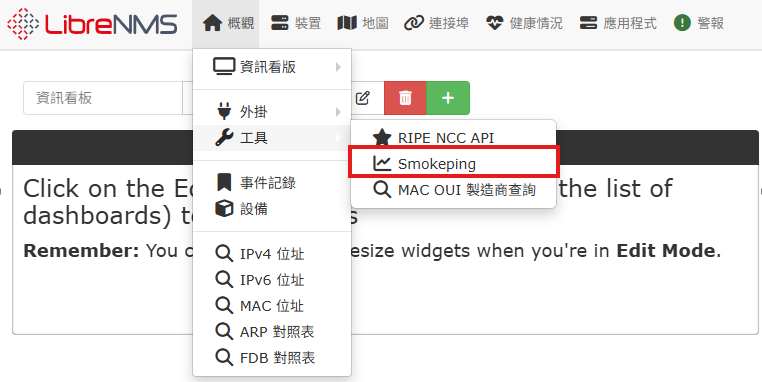
##### **安裝Smokeping** **下載Smokeping** ``` apt-get install smokeping ``` **複製Librenms smokeping腳本到cron** ``` sudo cp /opt/librenms/misc/smokeping-debian.example /etc/cron.hourly/librenms-smokeping sudo chmod +x /etc/cron.hourly/librenms-smokeping ``` **手動執行cron一次並確認有建立檔案** ``` /etc/cron.hourly/librenms-smokeping ls -l /etc/smokeping/config.d/librenms-targets.conf ls -l /etc/smokeping/config.d/librenms-probes.conf ``` **[](https://note.homesitetw.com/uploads/images/gallery/2025-11/Zzvimage.png)** **刪除`/etc/smokeping/config.d/Probes`內容並新增以下** ``` *** Probes *** @include /etc/smokeping/config.d/librenms-probes.conf ``` **刪除`/etc/smokeping/config.d/Targets`內容並新增以下** ``` *** Targets *** probe = FPing menu = Top title = Network Latency Grapher remark = Welcome to the SmokePing website of Insert Company Name Here. \ Here you will learn all about the latency of our network. @include /etc/smokeping/config.d/librenms-targets.conf ``` **建立Smokeping資料儲存位置** ``` mkdir /opt/librenms/rrd/smokeping ``` **由於Smokeping執行會無法寫入`/opt/librenms/rrd/smokeping`** **須將smokeping加入librenms群組對`/opt/librenms/rrd/smokeping`可讀寫** ``` chown librenms:librenms /opt/librenms/rrd/smokeping usermod -a -G librenms smokeping ``` **網頁上設定剛剛建立的目錄,並設定每次測試發 20 個封包** **[](https://note.homesitetw.com/uploads/images/gallery/2025-11/jR6image.png)** **編輯`/etc/smokeping/config.d/Database`,修改step改為每分鐘做一次測試(預設5分鐘)** **[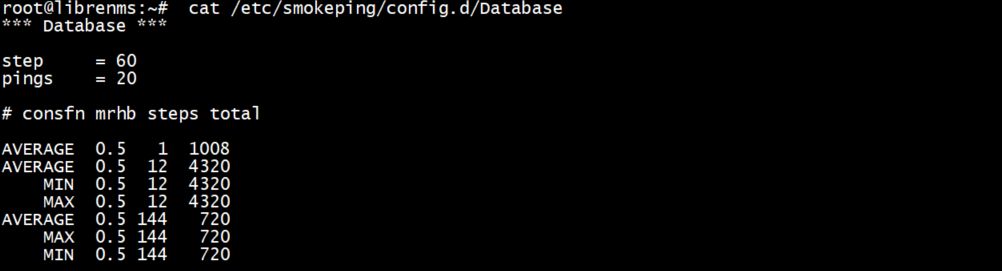](https://note.homesitetw.com/uploads/images/gallery/2025-11/N53image.png)** **編輯`/etc/smokeping/config.d/pathnames`,datadir 改為上面新增的目錄** **[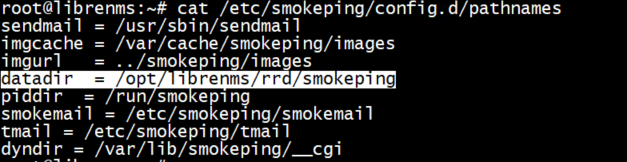](https://note.homesitetw.com/uploads/images/gallery/2025-11/ULsimage.png)** **重啟smokeping** ``` service smokeping restart service smokeping status ``` **確認Librenms RRD內的smokeping已有資料** **[](https://note.homesitetw.com/uploads/images/gallery/2025-11/QUyimage.png)** **網頁上Latency內已有smokeping數值** **[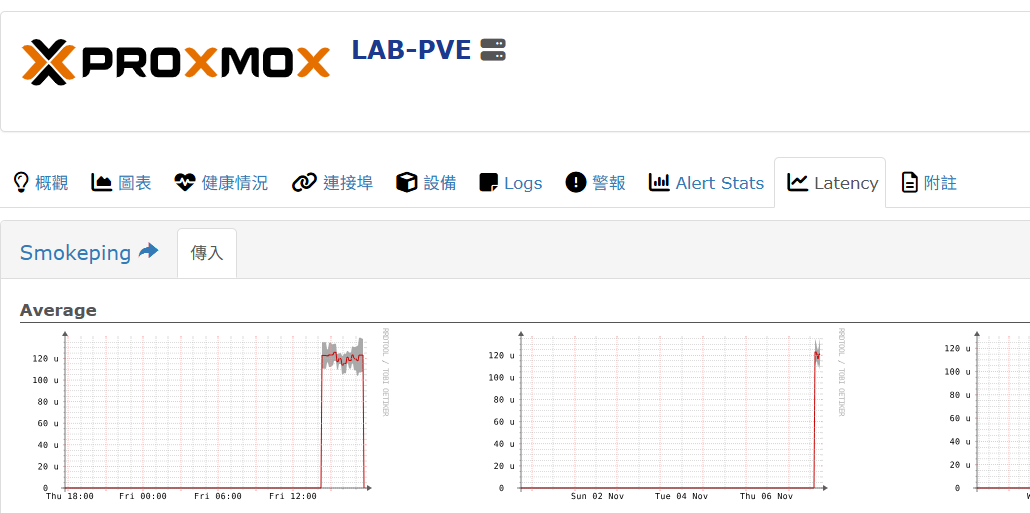](https://note.homesitetw.com/uploads/images/gallery/2025-11/ouIimage.png)** ##### **網頁 Web UI 設定** **安裝 fcgiwrap 才能使 CGI 包裝器與 Nginx 互動** ``` apt install fcgiwrap ``` **編輯`/etc/nginx/conf.d/librenms.conf`設定檔加入smokeping設定** ``` # Browsing to `http://yourlibrenms/smokeping/` should bring up the smokeping web interface location = /smokeping/ { fastcgi_intercept_errors on; fastcgi_param SCRIPT_FILENAME /usr/lib/cgi-bin/smokeping.cgi; fastcgi_param QUERY_STRING $query_string; fastcgi_param REQUEST_METHOD $request_method; fastcgi_param CONTENT_TYPE $content_type; fastcgi_param CONTENT_LENGTH $content_length; fastcgi_param REQUEST_URI $request_uri; fastcgi_param DOCUMENT_URI $document_uri; fastcgi_param DOCUMENT_ROOT $document_root; fastcgi_param SERVER_PROTOCOL $server_protocol; fastcgi_param GATEWAY_INTERFACE CGI/1.1; fastcgi_param SERVER_SOFTWARE nginx/$nginx_version; fastcgi_param REMOTE_ADDR $remote_addr; fastcgi_param REMOTE_PORT $remote_port; fastcgi_param SERVER_ADDR $server_addr; fastcgi_param SERVER_PORT $server_port; fastcgi_param SERVER_NAME $server_name; fastcgi_param HTTPS $https if_not_empty; fastcgi_pass unix:/var/run/fcgiwrap.socket; } location ^~ /smokeping/ { alias /usr/share/smokeping/www/; index smokeping.cgi; gzip off; } ``` **重啟Nginx** ``` nginx -t service nginx restart ``` **網頁上URL填入`/smokeping`** **[](https://note.homesitetw.com/uploads/images/gallery/2025-11/H2Nimage.png)** **重整網頁後選擇`工具`>`smokeping`** ``
**[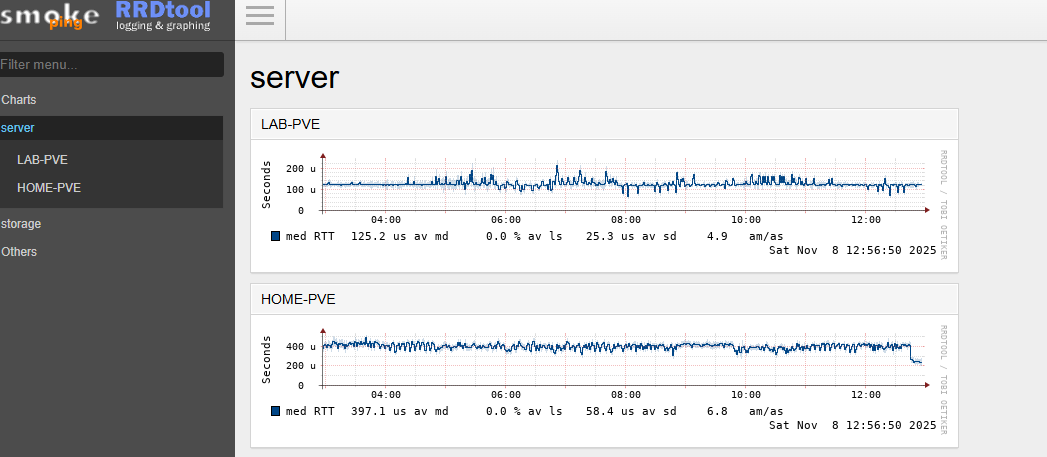](https://note.homesitetw.com/uploads/images/gallery/2025-11/J4dimage.png)**
##### **自訂監控設定**
**安裝好Web UI後顯示的是Librenms監控的設備清單,可自行加入host監控**
**編輯`/etc/smokeping/config.d/Targets`,新增自訂監控設定**
```
@include /etc/smokeping/config.d/custom.conf
```
**編輯`/etc/smokeping/config.d/custom.conf`,加入想要監控的host**
```
+ Others
menu = Others
title = Others
++ GoogleDNS
menu = Google DNS
title = Google DNS
host = 8.8.8.8
++ CHTDNS
menu = CHT DNS
title = CHT DNS
host = 168.95.1.1
```
**確認設定正確後重啟服務**
```
smokeping --check
service smokeping restart
```
**網頁上即可看到剛剛新增的host**
[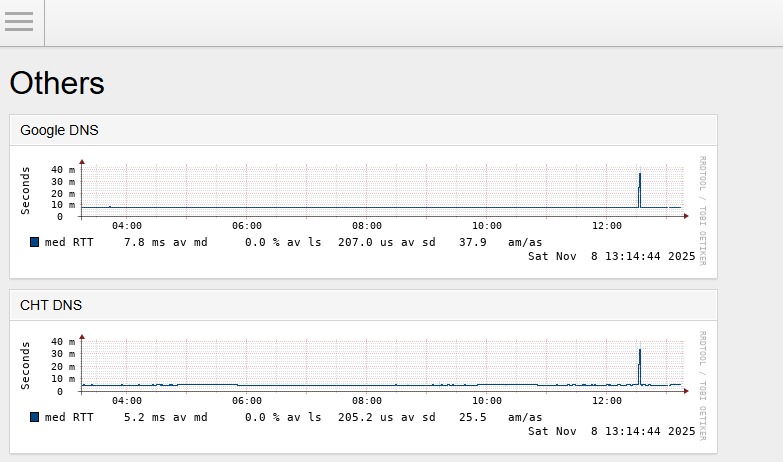](https://note.homesitetw.com/uploads/images/gallery/2025-11/buDimage.png)
##### **自訂Probes**
**除了內建使用fping,也可以下載Github上的[tcpping](https://github.com/deajan/tcpping "tcpping"),使用traceroute和tcptraceroute的命令,增加TCP PORT的監控**
```
curl -o /usr/bin/tcpping -L https://raw.githubusercontent.com/deajan/tcpping/master/tcpping
chmod +x /usr/bin/tcpping
```
**測試tcpping正常**
```
root@librenms:~# tcpping google.com 443
seq 0: tcp response from nctsaa-ac-in-f14.1e100.net (142.250.196.206) 7.402 ms
seq 1: tcp response from hkg07s38-in-f14.1e100.net (142.250.204.46) 7.545 ms
seq 2: tcp response from lctsaa-aa-in-f14.1e100.net (142.250.66.78) 7.399 ms
```
**預設情況下,traceroute 需要 root 權限,所以要允許smokeping使用traceroute**
**建立`/etc/tcpping.conf`設定檔,並加入`-Z`參數(使用sudo)**
```
TCPPING_EXTRA_ARGS="-Z"
```
**執行`visudo`,讓 smokeping 以 root 身分執行 traceroute 無須密碼**
```
smokeping ALL=(ALL) NOPASSWD: /usr/bin/traceroute
```
**編輯`/etc/smokeping/config.d/Probes`,增加tcpping**
```
+ TCPPing
binary = /usr/bin/tcpping
```
[](https://note.homesitetw.com/uploads/images/gallery/2025-11/3Znimage.png)
**在監控設定檔內新增需要的host並指定probe和port**
```
++ Google-https
menu = Google https
title = Google https
probe = TCPPing
port = 443
host = google.com
```
**重啟smokeping後可以看到probe使用TCP Ping**
[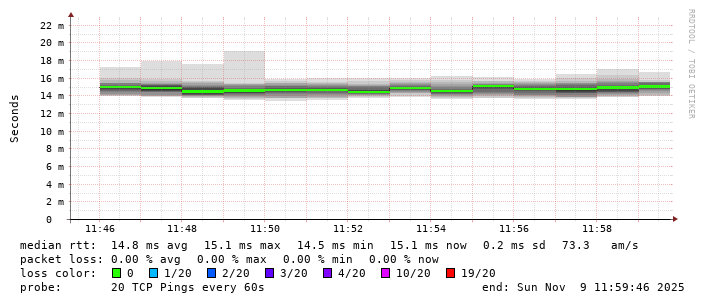](https://note.homesitetw.com/uploads/images/gallery/2025-11/CCyimage.png)