# PVE 安裝 homeassistant
#### **安裝 Home Assistant (HAOS)**
**[https://community-scripts.org/scripts/haos-vm?id=haos-vm&ref=spacen.io](https://community-scripts.org/scripts/haos-vm?id=haos-vm&ref=spacen.io)**
**[haos-vm.sh](https://note.homesitetw.com/attachments/9)**
**在PVE命令行使用社群腳本指令安裝即可**
```
bash -c "$(curl -fsSL https://raw.githubusercontent.com/community-scripts/ProxmoxVE/main/vm/haos-vm.sh)"
```
**基本上使用預設安裝到底就完成**
#### **進入****Home Assistant**
**啟動後輸入IP:8123 完成剩餘安裝**
#### **直通USB裝置**
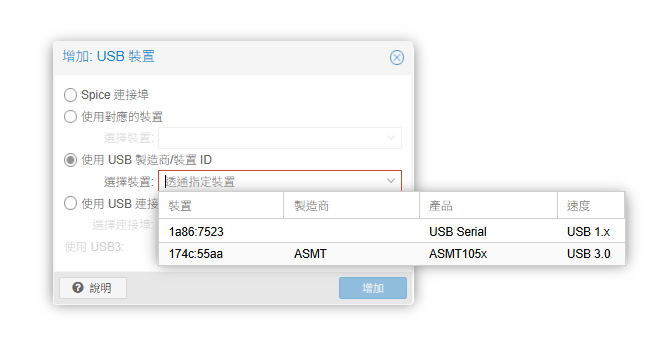
**若有USB(例如Zigbee)需要使用需加入到VM中**
[](https://note.homesitetw.com/uploads/images/gallery/2026-10/Motimage.png)
**選擇你的USB裝置在重新啟動即可**