# PVE 發送syslog到遠端伺服器
##### **運行環境**
- **PVE 8.2**
##### **設定rsyslog**
**由於PVE已改成`systemd-journald`簡化日誌架構,需啟用轉發到Syslog並安裝rsyslog傳送log到遠端**
**編輯`/etc/systemd/journald.conf`**
```
ForwardToSyslog=yes
```
**安裝rsyslog**
```
apt install rsyslog
```
**新增`/etc/rsyslog.d/remotelog.conf`**
**傳送所有log**
```
*.* @remoteip:516
```
**篩選log,範例為篩選sshd程式訊息包含pam\_unix則傳送**
```
if ($programname == "sshd" and $msg contains "pam_unix") then {
action(type="omfwd" target="remoteip" port="516")
stop
}
```
**重啟系統服務**
```
systemctl enable rsyslog
systemctl restart rsyslog
systemctl restart systemd-journald
```
##### **測試**
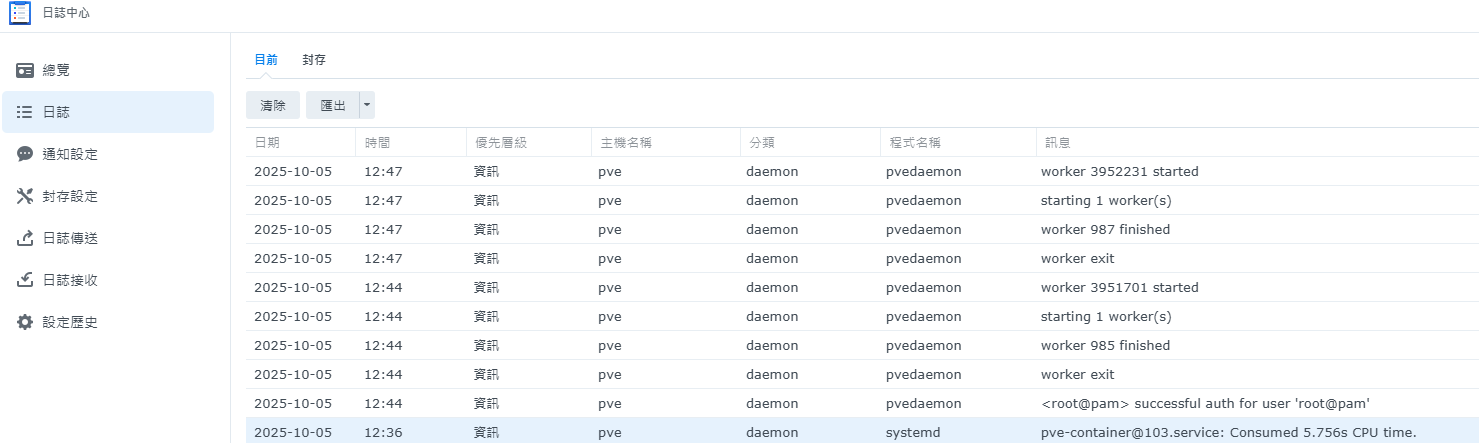
**使用Synology日誌接收,確認有PVE的log**
[](https://note.homesitetw.com/uploads/images/gallery/2025-10/wy7image.png)